Living Network: 105 industry use cases, each with a scenario you can play
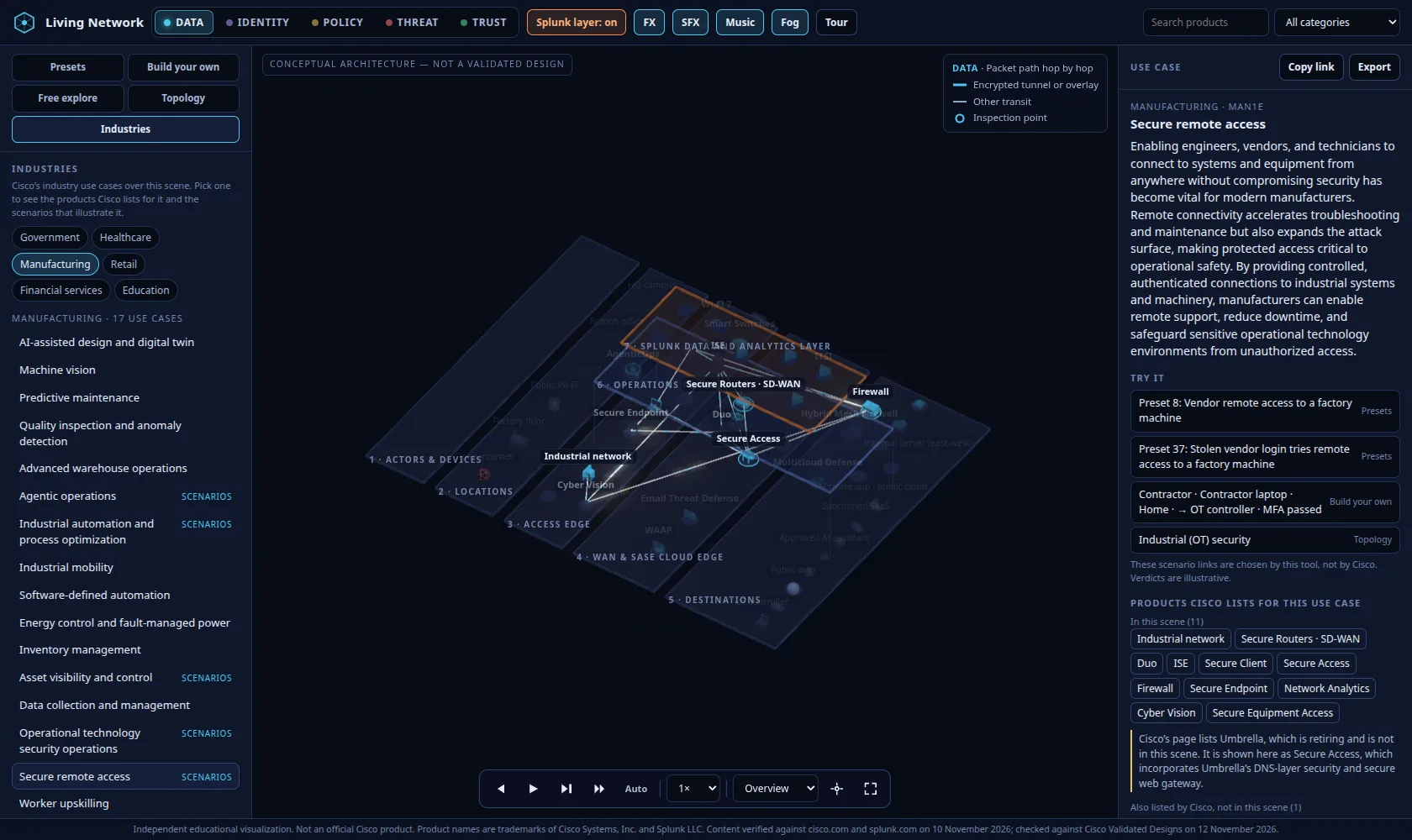
A vendor on a home laptop asks for a factory machine. Duo checks them, Secure Equipment Access opens a narrow session, and the rest of the plant stays dark.
The first version of Living Network let you watch one person walk a path and see which product decided what. The question that came next is the one a partner actually asks: what does that look like for a hospital, a factory, a campus, or a bank?
Cisco publishes that answer as 105 industry use cases, on the Industries Portfolio Explorer. I put all of them into the same scene. Open the Government industry.
What you can open
There are six industries:
- Government, 18
- Healthcare, 16
- Manufacturing, 17
- Retail, 18
- Financial services, 17
- Education, 19
Pick Manufacturing and open Secure remote access. The products Cisco lists for that use case stay lit. Everything else fades. White lines draw only the relationships those products already have in the scene. The panel is Cisco's own text: the description, the drivers, the capabilities, the benefits, and the "Why Cisco" points. Products that are in the scene are listed. Products Cisco names that have no model here are listed separately, as not in the scene.
Try it
Reading a use case is not the same as watching one. Each use case has a Try it block: one or more presets, a builder scenario filled in from the same five pickers, and the closest architecture in Topology. Open one and the use case stays above the result as industry context, until you pick something else.
The library already had 37 presets. Many use cases were already illustrated by one of those, so I reused them. Sixty-two were not. Those became presets 38 to 99, built only from the actors, devices, places and behaviours the tool already had. A camera is a sensor. A contact centre is a remote worker. A hologram store associate is someone using an approved AI assistant. No new verdict rule was added for any of them.
A link means "this scenario illustrates what the use case is about." It does not mean the verdict is what Cisco promises for that use case. The page says so.
What I did not invent
The use case text and the product and service lists are Cisco's, taken from the six data files behind the Portfolio Explorer on 13 November 2026. The lines between products were already in the scene, taken from public pages on cisco.com and splunk.com. Cisco's use case page lists products. It does not state those lines, so I did not pretend that it does.
Where Cisco uses a name that has a successor in the scene, the successor is what you see. Umbrella is retiring, so it is shown as Secure Access, which took on its DNS-layer security and secure web gateway, and the panel says that in words. Names with no counterpart, 143 of them, stay in the "not in this scene" list. Catalyst Center is the one that comes up most often.
Thirty-four of the forty products in the scene are named by at least one use case. A use case view is not a Cisco reference design. It is the products Cisco lists for that use case, sitting where the scene already puts them.
Still a teaching tool
The verdicts are the same illustrative outcomes as before: allow, allow with limits, step-up, block, or contain. They show a typical zero-trust result, not guaranteed product behaviour. It is not an official Cisco product, and it does not use Cisco artwork.
The page is still one HTML file, with no backend. The use cases live in their own data file beside the rules, so the portfolio can be refreshed without touching the scene.